
... so that it should be easier to automatically import feeds in LinkedIn groups etc.
http://feeds.feedburner.com/xqualblog
Thursday, December 8, 2011


Wednesday, December 7, 2011
XStudio 1.6a1: Requirement coverage on sessions
Some new coverage metrics will be added in XStudio 1.6a1 including probably the most interesting one everybody is looking for: requirements and specifications coverage.
Here is how it looks like:

What you can observe in this new "Requirements" tab design:
- individual results of requirements/specifications (not covered, success, failure, unknown)
- for each container, the nb of requirement with a specific result
- for each container, some visual indication on the percentage of each
Hope you like it!
Thursday, December 1, 2011
XStudio 1.6a1: Mixed test campaigns
Mixed campaign is a long story. This feature has been requested for long but it was technically requiring so many changes in the code architecture that it had been delayed several times.
But now it's done!
In terms of GUI, the changes are minimal though. you will notice only a couple of new radio buttons in the campaign's "Order" panel:

When you create a new test campaign, just select all the tests you want to be part of that campaign. These tests can be of different kinds (i.e. 3 Selenium scripts + 2 JUnit tests + 4 manual tests). You can reorder those tests manually by using the order toolbar but you can also use one of the two automatic ordering buttons (this will reorder automatically your tests by dependencies or by priorities).
Here comes the news: you have now 2 new options:
1) execute tests from different categories in parallel
In this case, tests from each category will be gathered and executed in a separate and independant thread. Within a single category/thread, all the tests will be executed following the order globally defined but each category will be running on its own and only its set of tests. In this case, there is NO synchronization between categories/launchers.
2) execute tests from different categories in sequence exactly as defined in the order you just set
In this case, the system will execute the tests exactly in the order you defined. At one time there will be only one launcher working.
This second option makes it possible to create sequences of tests mixing completely automated tests with manual tests. For instance, this could allow to manually configure a system then run all the automated tests and complete the campaign by performing some additional manual cleaning operations. This also allows mixing different types of automated tests in one single sequence.
I Cannot think yet about all this brings but it definitely brings a lot of opportunities in your way to test!
Monday, September 5, 2011
XStudio 1.5: New tools on Tabular Manual Launcher
As planned some new tools have been implemented in the Tabular Manual Launcher.
They include:
What will have to wait for sure for 1.6:

They include:
- Reset all testcases with success/failure/relative/not_executed status. On pressing the Submit button a dialog pops up and asks if it is needed to clear all the comments as well
- List & open the attachments for tests and test cases
- List & edit bugs (integrated, generic, mantis, bugzilla, jira trac) associated to tests
- Auto-submission of the comments on focus lost (at least ! :)). In addition, it's now easy to identify the comments being edited (not yet submitted) and those already submitted
- Edit/delete tests
- Edit/delete test case
What will have to wait for sure for 1.6:
- Create new test
- Create new test case

Wednesday, July 20, 2011
XStudio 1.5: User Profiles
Starting with XStudio 1.5a5, instead of setting the rights to the users, it will be possible to create some custom user profiles and for each user select one in the list.
By default, 6 user profiles will be present. It will be possible to delete all of them except the "Administrator" one and of course it will be possible to add some new ones. User profiles can be created, copied, edited and deleted. If the user profile associated to one or several users is deleted, the users will loose all their rights until they are associated to another user profile.
The good thing is that if at one point you edit a user profile, the changes will apply to all users associated to this profile. When you create a new user, it will also be easier to set his rights as he will probably need some rights that you already defined in one user profile.


WARNING: By default, when migrating to 1.5a5 all the users will be associated to the "Administrator" user profile. You'll have to associate your users to either the default profiles that fit or create you own user profiles and individually associate your users to appropriate ones.
By default, 6 user profiles will be present. It will be possible to delete all of them except the "Administrator" one and of course it will be possible to add some new ones. User profiles can be created, copied, edited and deleted. If the user profile associated to one or several users is deleted, the users will loose all their rights until they are associated to another user profile.
The good thing is that if at one point you edit a user profile, the changes will apply to all users associated to this profile. When you create a new user, it will also be easier to set his rights as he will probably need some rights that you already defined in one user profile.


WARNING: By default, when migrating to 1.5a5 all the users will be associated to the "Administrator" user profile. You'll have to associate your users to either the default profiles that fit or create you own user profiles and individually associate your users to appropriate ones.
Friday, April 29, 2011
XStudio 1.5: Custom fields
One of the major addition to 1.5 will be the abilty to customize the details forms for the requirements, specifications, test cases and bugs.
If you have the appropriate rights, adding a new custom field will be easy enough:
 Different types of fields will be available:

With those example settings, the details tab of a bug would look like:

Note: this feature will be probably delivered through a commercial plugin (very cheap - around 30€ per user). It will be also delivered freely to all the users who have formerly (or are going to) contracted a support license.
If you have the appropriate rights, adding a new custom field will be easy enough:
 Different types of fields will be available:
- integer (text field)
- string (text field)
- boolean (checkbox)
- formatted tring (wiki-style field) - see example above
- drop-down menu (combo box)
- select a position where to insert its custom field
- specify if the field is mandatory or not
- specify a default value
- list all of the possible values (in case of the drop-down menu)

With those example settings, the details tab of a bug would look like:

Note: this feature will be probably delivered through a commercial plugin (very cheap - around 30€ per user). It will be also delivered freely to all the users who have formerly (or are going to) contracted a support license.
Sunday, April 24, 2011
XStudio 1.5: Images and URLs in formatted text widgets
One feature that has been requested by many customers was the possibility to embed images and anchors in formatted text fields. This will be possible in 1.5.
Images are physically stored in the database so that the user does not have to worry about maintaining an external repository.
The GUI is very simple and is as presented below:

To embed an image, just click the "image" button and select an image on your hard-disk:

The wiki tags for Images and anchors are the following:

For images, the name of the image is automatically prefixed with a unique id corresponding to the id of the image file in the database.
When previewing a formatted text embedding an image, the image will be of course rendered. The image is also rendered in reports.

Images are physically stored in the database so that the user does not have to worry about maintaining an external repository.
The GUI is very simple and is as presented below:

To embed an image, just click the "image" button and select an image on your hard-disk:

The wiki tags for Images and anchors are the following:

For images, the name of the image is automatically prefixed with a unique id corresponding to the id of the image file in the database.
When previewing a formatted text embedding an image, the image will be of course rendered. The image is also rendered in reports.

Sunday, March 13, 2011
XStudio 1.5: IDs in trees
Certain people prefer to see the Ids of any object in the trees.
In XStudio 1.5, an option in the settings will allow to activate this feature.
Hence the display can look like:

In XStudio 1.5, an option in the settings will allow to activate this feature.
Hence the display can look like:

XStudio 1.5: Customizable email notifications
Starting with XStudio 1.5, email notification will be generated using the same mechanism than for reports. This means that the content of the email will be the results of an XML (generated by XStudio and including all the required data) transformed through an XSLT.
Since you can edit and modify the XSLT, you can customize your email notification presentation (for instance the logo but also the data you want to include, their orders, the colors etc. etc.).
In addition to this, the number of data included in the bug notification are bigger. With the default transform provided, the results is:

Since you can edit and modify the XSLT, you can customize your email notification presentation (for instance the logo but also the data you want to include, their orders, the colors etc. etc.).
In addition to this, the number of data included in the bug notification are bigger. With the default transform provided, the results is:


XStudio 1.5: New settings to better control notifications
In XStudio 1.5, new settings will appear to better control email notification mechanisms:
Send additional notification per failed test case:
When you're running non-regression campaigns, this option can be useful as it will send you a specific notification as soon as one test case is failing (regression). The notification is sent immediately while the session is still running. One notification per failed test case is sent.
Send bug notification only on status change:
This option will limit the email notification to the case where the status of the bug has been changed.

Also, for the integrated bug-tracking database, a new butto allows sending a reminder to all people involved in the bug:

Send additional notification per failed test case:
When you're running non-regression campaigns, this option can be useful as it will send you a specific notification as soon as one test case is failing (regression). The notification is sent immediately while the session is still running. One notification per failed test case is sent.
Send bug notification only on status change:
This option will limit the email notification to the case where the status of the bug has been changed.

Also, for the integrated bug-tracking database, a new butto allows sending a reminder to all people involved in the bug:

XStudio 1.5: User-groups, projects and access-rights
XStudio already has a great set of options to authorize users to execute certain actions or not depending on their profile. This is what we call "Actions rights".
With XStudio 1.5, a new feature will allow restricting users to view only a subset of the objects in the Data-Model. For instance, you will want some people to work on a specific project and you want them to be isolated from the rest (you don't want them to see what the others are working on).
To do so, you will be able to create groups of users. Each user group will be granted to access certain folders in ANY XStudio tree. This is what we call "Access rights". If a user is member of several groups, all the rights will be cumulated and given to the user.
Here are a few screenshots:
 Members of a user group
 Selection of Access Rights for a user group
 User group members
With XStudio 1.5, a new feature will allow restricting users to view only a subset of the objects in the Data-Model. For instance, you will want some people to work on a specific project and you want them to be isolated from the rest (you don't want them to see what the others are working on).
To do so, you will be able to create groups of users. Each user group will be granted to access certain folders in ANY XStudio tree. This is what we call "Access rights". If a user is member of several groups, all the rights will be cumulated and given to the user.
Here are a few screenshots:
 Members of a user group
 Selection of Access Rights for a user group
 User group members
Saturday, March 12, 2011
XStudio 1.5: Microsoft Word document parser
Before using a real Test Management system, people often use Microsoft Word to write their requirements or specifications.
With XStudio 1.5, a tool allowing to read all your Word documents and generate an XML file will be delivered. Hence, you will be able to import very simply all your requirements/specifications in XStudio:
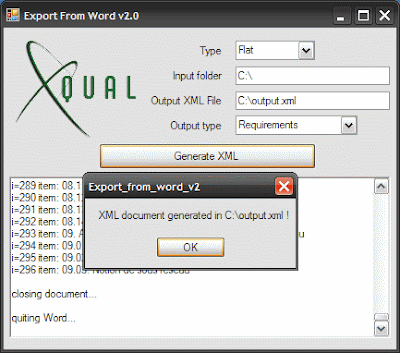
2) the "Flat" mode reads on the summary of the Word document and import any entry (inluding the head numbering)
With XStudio 1.5, a tool allowing to read all your Word documents and generate an XML file will be delivered. Hence, you will be able to import very simply all your requirements/specifications in XStudio:
- Install and run Export from Word v2.0

- Indicate a type of export (Flat or Deep)
- Indicate the root folder containing all the Word documents
- Press "Generate XML"
- Open XStudio and import the generated file
2) the "Flat" mode reads on the summary of the Word document and import any entry (inluding the head numbering)
Monday, February 21, 2011
XStudio 1.5: Import requirements from Word documents
We are working at the moment on a Word exporter.
The goal is to be able to read/parse some Word document to export requirements in an XML file that XStudio can import.
2 modes are available:
1) the "deep" mode reads the Word document and will interpret any "leaf" tree node as a requirement. All its parent chapters will be imported as folders in the requirement tree
2) the "flat" mode reads on the summary of the Word document and import any entry (inluding the head numbering)
The programs takes 2 arguments:
ExportFromWord.exe inputFolder outputXML
All the Word documents in the input folder are parsed but only one single output XML is generated.
Example:
ExportFromWord.exe "C:\Documents and Settings\egavaldo\Desktop" "C:\exportFromWord.xml"
The goal is to be able to read/parse some Word document to export requirements in an XML file that XStudio can import.
2 modes are available:
1) the "deep" mode reads the Word document and will interpret any "leaf" tree node as a requirement. All its parent chapters will be imported as folders in the requirement tree
2) the "flat" mode reads on the summary of the Word document and import any entry (inluding the head numbering)
The programs takes 2 arguments:
ExportFromWord.exe inputFolder outputXML
All the Word documents in the input folder are parsed but only one single output XML is generated.
Example:
ExportFromWord.exe "C:\Documents and Settings\egavaldo\Desktop" "C:\exportFromWord.xml"
Study: Risk-based design
- make it simple enough so that people actually use it
- provide a certain level of customization
- must be mapped on XStudio's data-model which is basically:

Now, here is what I’m thinking of:
Business Requirements:
For each requirement, the user will have to provide:
a) a "probability/frequency" P value (between 1 and 5)
b) a "consequence/cost" C value (between 1 and 5)
Then each requirement have a computed "business risk" Br=P*C (between 1 and 25)
Technical Specifications:
For each specification, the user will have to provide:
a) a "technical risk/complexity" R value (between 1 and 10)
Tests:
The system will parse the graph linking each test to its related specifications then its related requirements and will compute a "criticality" Cr value based on some calculation:
Not sure what is the best formula yet though.
(A and B are user-customizable constants.)
Formula#1: no requirement duplicate


Formula#2: all path
We could also recursively parse the graph and authorize duplicate requirements:


Output for the user:
This will allow providing many metrics to the user including 2 major ones:
1) a graph showing the distribution of tests (risk / number of test cases)
This is useful to check the correlation between risk and nb of test cases implemented per test (you do want that the more risky tests are tested the more in details so have the more test cases).

2) more importantly, some "risk-weighted-coverage" statistics
The normal coverage metrics give basic information about how much the requirements are covered but it does consider any requirement/specification with the same “weigth”. the "risk-weighted-coverage" would introduce in the calculation the criticality notion. If a highly critical test is succeeding and a low-criticity test is failing, the risk-weighted-coverage will be much better that the opposite way even though there are only 2 test.
Presentation will be as the standard coverage currently displayed.
Many other metrics might be deliverable to the user (need to think more about it).
Release of XStudio 1.4sp5
XStudio 1.4sp5 has been released today.
This is a maintenane version fixing a couple of bugs releated to JIRA and TRAC connection.
This is a maintenane version fixing a couple of bugs releated to JIRA and TRAC connection.
Subscribe to:
Posts (Atom)